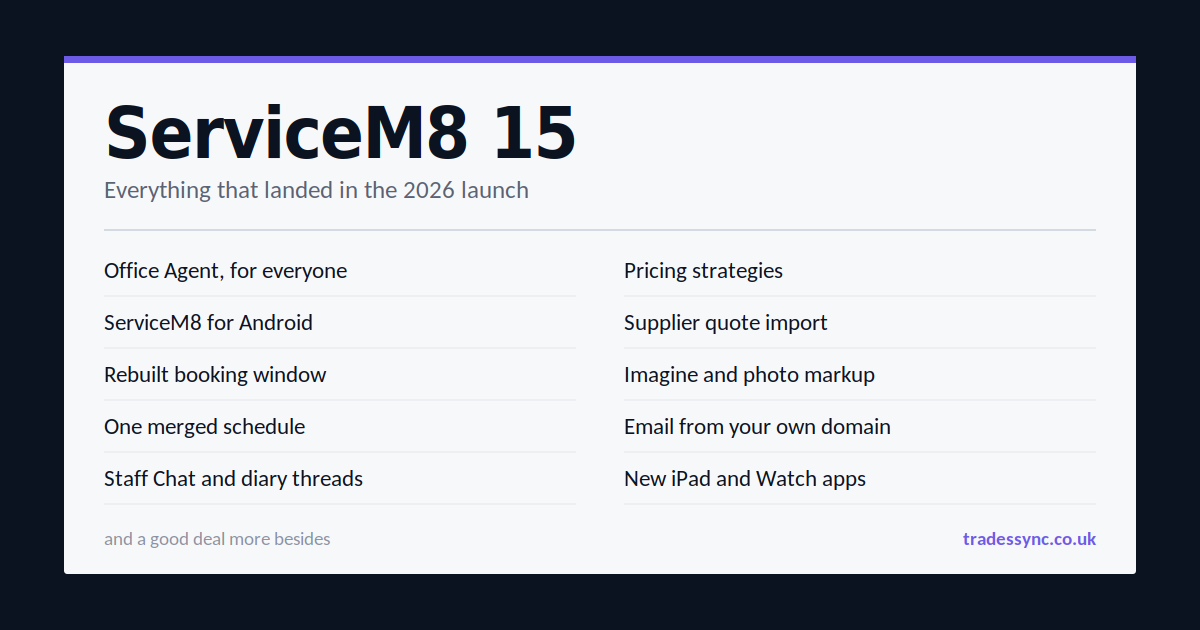
ServiceM8 15 went live this morning and it's a big one. This isn't one headline feature with a load of padding behind it. Almost every part of the platform has been touched. Here's everything, in plain English.
Office Agent is now open to everyone
This is the headline. Office Agent is an AI assistant that sits inside ServiceM8 and actually does things, rather than just answering questions.
Open it alongside a job and ask what happened on that job and whether it's ready to invoice. It reads the job details and the diary and tells you. Ask it to find your highest value quotes still waiting on a reply and draft a chase-up for each. Ask which customers owe you the most and it'll build the report in the conversation. It can draft a full quote or invoice from the job data, recorded time, diary notes and your Knowledge articles, then show you the suggested action to approve or decline.
It's also in the app, by voice. Open a job, talk to it normally, interrupt it, correct it. Add a note, check a colleague's availability, book the return visit, draft the customer SMS. All hands-free from the van.
The second half is the Task Manager. You set up recurring instructions in normal language, something like "every weekday at 8:30, review the jobs in Action Required, pick the five that most need attention and prepare the next step". It then runs on its own in the background, leaving prepared actions waiting for your approval.
When it gets something wrong, you decline it and say why. "We always give this type of job to Sarah." It remembers, and applies that next time.
The bit that isn't in the marketing. Office Agent has a daily usage allowance based on your plan. Scheduled recurring tasks and higher limits are a paid monthly add-on on top. Worth knowing before you build your whole morning routine around it.
ServiceM8 for Android, no more "Lite"
The Lite badge is gone. Android is now the full app.
Photo markup, video capture, document scanning, barcode scanning, route optimisation, the client list with job history, calendar and map views, asset scanning and editing, Knowledge, full inbox management, proposal creation and sending, deposits, payments including Tap to Pay on Android. It's all there. Plus everything new in ServiceM8 15: Office Agent, the new schedule, diary threads, reactions and the new notifications.
If you've been holding off on ServiceM8 because half your lads are on Samsungs, that objection has gone.
A completely rebuilt booking window
The old booking window suggested a few times and left you guessing if none of them suited. The new one shows you the whole week.
White means someone's free, grey means they aren't, green blocks are ServiceM8's suggestions. Pick one and you're done in three clicks, because it chooses the time and the staff member for you. Or pick a specific person and you're looking at their real week. Actual bookings, travel time between them, genuine gaps.
The calendar itself is the input. Click a space to place the booking, drag it, resize it. Put it over another booking or outside business hours and it warns you rather than blocking you. The button changes to "save anyway", because sometimes you know something the schedule doesn't.
Other bits worth knowing:
- Change the staff member on the booking and it only offers people actually free at that time
- Customer availability presets like "mornings" or "after 3". It can also read something like "Tuesdays and Thursdays after 2" out of your job notes and apply it
- Crew bookings. Pick several people, say whether all of them or any one of them needs to attend, and it does the availability maths
- Multi-day jobs across non-consecutive days, with partial days on each
- Send times to the client and let them pick
One schedule instead of two
The separate Calendar and Staff Schedule have been merged into a single Schedule.
Day view keeps staff in rows with bookings coloured by job status. Week by day gives the calendar layout with a status dot on each booking. Month gives you the overview.
What's new. You can choose what information shows on each booking card. Overlapping bookings expand the row so nothing hides, and you control which staff are visible and in what order. Job allocations now appear in every view. There are new staff column views (day, three day, week) and new row views (week, two week) that show remaining capacity per person per day.
Right click a booking to push it to tomorrow, same day next week, convert it to an allocation or cancel it. There's undo and redo, which means they've binned the "are you sure?" pop-ups. You can hide weekends, and there's a weather forecast for the week ahead.
Team communication
Staff Chat is new. Direct messages with images and files, plus channels. Public channels for the business, a team or a project, private ones for management or finance. Office staff use it online, field staff in the app, same conversation.
Diary threads and reactions. You can now reply directly to a job diary note instead of writing a new one and hoping the context holds. The original author gets notified and everyone in the thread stays in the loop. You can also just drop an emoji when a full reply isn't needed.
Notifications have been rebuilt. Bigger panel, filters for all, unread and mentions, individual read and unread marking, and a full notifications page with a year of searchable history.
Send emails from your own domain
Through the Website & Email add-on, you can now authorise ServiceM8 to send from a domain you already own, so your emails carry your business identity. Your existing website, inbox and email provider carry on untouched.
This needs DNS records adding. If someone else looks after your domain, that's a job to hand them.
Materials and pricing
This is the quiet one that'll save the most money.
Pricing strategies let you systemise how cost becomes sell price. A fixed markup applies one percentage to everything. Tiered markup applies different percentages at different cost levels, so 100% under £50, 60% from £50, 35% from £200.
Worth correcting a bit of misinformation doing the rounds. Strategies are not limited to supplier price list imports. You can set one directly on a material in the new editor, set a default for new materials, or select a batch of existing materials and apply one in bulk. The pricing fields update live as you change them.
Also new:
- Supplier quote import. It already read supplier invoices. Now it reads quotes too, and you can apply the items individually or as a bundle
- Material history on the job, so you can see who added, changed or removed each item, when, and whether it came from a person or an integration
- Barcode lookup from the job camera. Point it at a barcode, get the material, price and stock without leaving the camera
- Full materials management in the app, including bundles
- Bundle images, which show in proposals so customers can see what each option actually is
- A preference to keep job and proposal templates updated when material prices change
- New list views across materials, jobs, clients and bundles, with customisable columns, sorting, and it remembers your settings
Imagine and photo markup
Imagine has come to the app. Take a job photo, describe the change, and it generates a version showing the finished result. Add a reference photo to steer the style, or draw on the original to show exactly where something goes. Used inside a proposal, it drops the generated image straight back in. So instead of asking a customer to picture it, you show them.
Photo markup is now online too. Draw on any job photo from the dispatch board with lines, arrows, shapes and text. The marked-up version saves as a new photo and the original stays as it was.
ServiceM8 Phone
Better call connections, transfers and call quality in the app. The Voice Agent has had upgraded AI models behind it, easier policy-based setup, and better handling of natural conversation. It waits when you trail off and doesn't jump in over "yep" and "mm-hm".
There's also a new caller blocklist. Block a number from the call details and future calls are rejected before any phone rings. No inbox item, no notification, no voicemail. Blocked calls still show in history and you can unblock any time.
Knowledge and Toolbox Meetings
The Knowledge add-on has been improved for creating and organising your business know-how. New alongside it is Toolbox Meetings. Pick who's attending, hit record, and at the end ServiceM8 transcribes it, writes a summary into Knowledge and keeps the audio.
For anyone who needs to evidence that briefings actually happened, that's a compliance win as much as a convenience one.
iPad, Apple Watch and the app
The iPad app has had the biggest overhaul. Apple standard navigation with a switchable tab bar and sidebar, the new schedule with drag and drop from the job list and queues, and the big one, job details and job diary side by side, like online. Street View sits at the top of the diary, and you can open billing alongside it.
There's a new Apple Watch app, rebuilt from scratch. It no longer needs your iPhone nearby. See your current job, clock on and off, check out, and record a voice note that gets transcribed into the job diary.
App improvements. Forward an email from the job diary, a dedicated attach file action, form search, a full form mode showing every question at once, better photo pickers in forms, room scans that capture wall colours, and account switching for anyone running more than one ServiceM8 account.
Custom avatars. Take a selfie and it generates an avatar in the ServiceM8 style. Wear a hat in the photo and your avatar wears a hat.
Smaller improvements
- Job notes expand as you type
- Hide completed tasks and checklist items
- Clearer job history on the client card
- Preview a quote or invoice before sending
- Search recurring jobs by address or category
- Duplicate an existing form template
- Default expiry on job allocations
- An Automations mini tab on the job card showing scheduled customer messages
- Day names in booking messages
- Improved dashboard reports with more date ranges
Payments
The payment news is Australia only this time. Surcharging ends there on 1 October, and ServiceM8 Pay rates drop in response, along with a threshold setting to hide card payment on high value invoices and a bulk price increase wizard.
Nothing changes for UK users.
For the technical end
Two developments matter here.
Private add-ons built with AI. There's a new development toolkit you hand to an AI tool such as ChatGPT or Claude Code, then describe what you want. It builds and deploys a private add-on straight into your account, running on ServiceM8's own infrastructure. No developer account, no public listing, no hosting bill. Their examples were auto-assigning new jobs to a set staff member, and saved checklist templates by job type. It appears in your add-ons area like any other, and you can switch it off.
AI agents can now book your work. If you use a ServiceM8 hosted website or booking page, your business and services are now structured so AI tools can understand them. When a customer's AI assistant goes looking for a trade, it can read your services, answer your booking form questions and submit the booking directly.
Take that seriously. Customers have found trades through search engines for twenty years. The moment their assistant does the finding, being readable by that assistant becomes as important as ranking ever was.
ServiceM8 also works better inside supported AI tools now. Ask ChatGPT to show jobs needing attention and you get an interactive list, then update statuses, draft emails, schedule work or add diary notes from the conversation.
Anything on the API?
For anyone syncing ServiceM8 with other systems, the API has been opened up considerably over the past year. There are now event based webhook subscriptions for things like job created and job completed, alongside the existing field level ones.
Still no Proposals API, despite it being asked for repeatedly. Proposals remain something you build and send inside ServiceM8 only.
How to get it
The iOS and Android apps are in their stores now. For the online dashboard, go to ServiceM8's September 2026 update page and click the activation link, which puts the activation option in your Settings menu. That page is also ServiceM8's own feature rundown if you want to check anything here against the source.
The verdict
Some people watching the live stream thought it was thin. They were watching the wrong bits.
Android reaching parity is the single most commercially significant thing ServiceM8 has done in years. It kills the objection that has cost them customers since day one. The rebuilt booking window is a genuine daily time saver for anyone who schedules more than a handful of jobs a week. Pricing strategies will quietly protect more margin than any feature they've shipped in a decade.
Office Agent is the one to be measured about. The demo was impressive and the approve before it acts design is the right call. But it's usage limited, the good part costs extra, and AI that prepares actions is only as good as the information already sitting in your account. If your job diaries are thin and your Knowledge base is empty, it'll have nothing to work with.
Sort your data out first. Then let the agent loose on it.