If you take one thing away from this, take that sentence.
Almost every confused conversation I have with a tradesperson setting up GoHighLevel comes back to the same thing. They know ServiceM8 inside out. They've been running their work off job cards for years. Then they open GoHighLevel and get hit with contacts, opportunities, pipelines, stages, workflows, and none of it maps onto anything they recognise.
So they do what anyone would do. They ignore the bits they don't understand and use the bits they do. Which usually means they end up with a CRM full of names and no idea what any of that work is worth.
Here is the translation.
A ServiceM8 client is a GoHighLevel contact. That one's obvious and nobody gets it wrong.
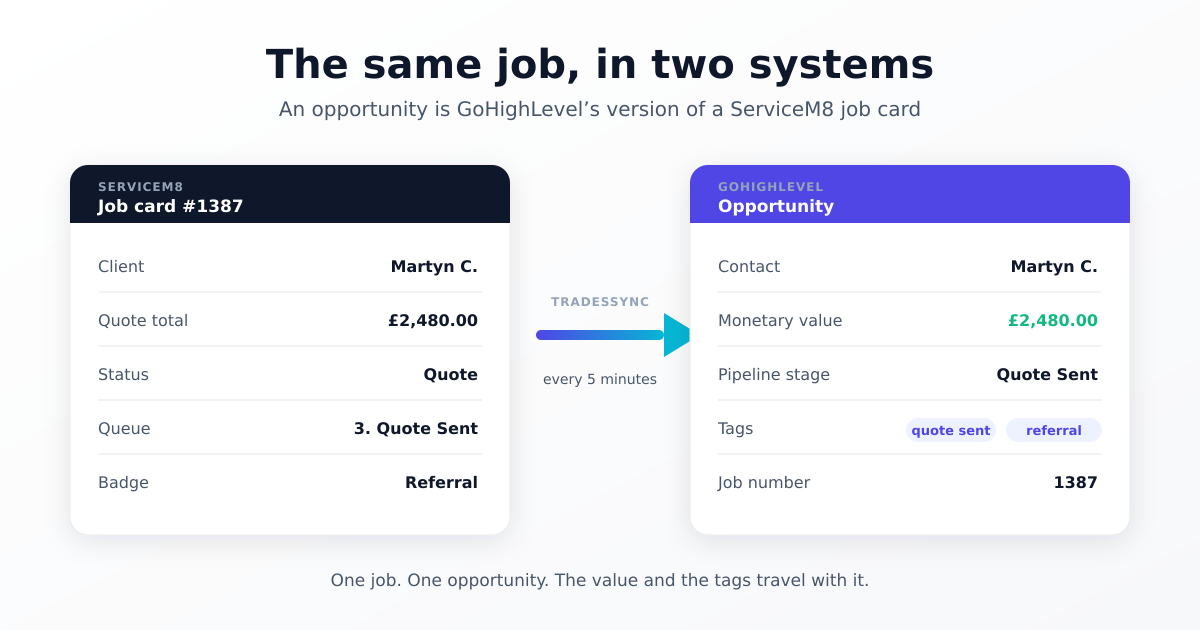
A ServiceM8 job card is a GoHighLevel opportunity. That one nobody tells you, and it's the one that matters.
Why that sentence unlocks everything
Think about what a job card actually is. It's one piece of work, for one customer. It has a value on it. It has a status telling you where it's up to. It's got a description, a number, dates, materials, notes.
Now think about what an opportunity is. One piece of work, for one customer. It has a monetary value. It sits at a pipeline stage telling you where it's up to. It can carry any fields you want to put on it.
They're the same object. Different software, different words, same idea.
Once that clicks, the rest of GoHighLevel stops being abstract. A pipeline is your job list. A stage is your job status. Moving an opportunity along the pipeline is dragging a job card between columns. You already know how to think about this — you've just been handed different vocabulary.
Where people go wrong
The mistake I see most often is putting everything on the contact.
It's an easy mistake, because a contact is the thing you understand first, and GoHighLevel will happily let you add custom fields to it. So people map the quote value to a custom field on the contact, look at it, see a number, and think job done.
Then they come back a month later and the numbers make no sense.
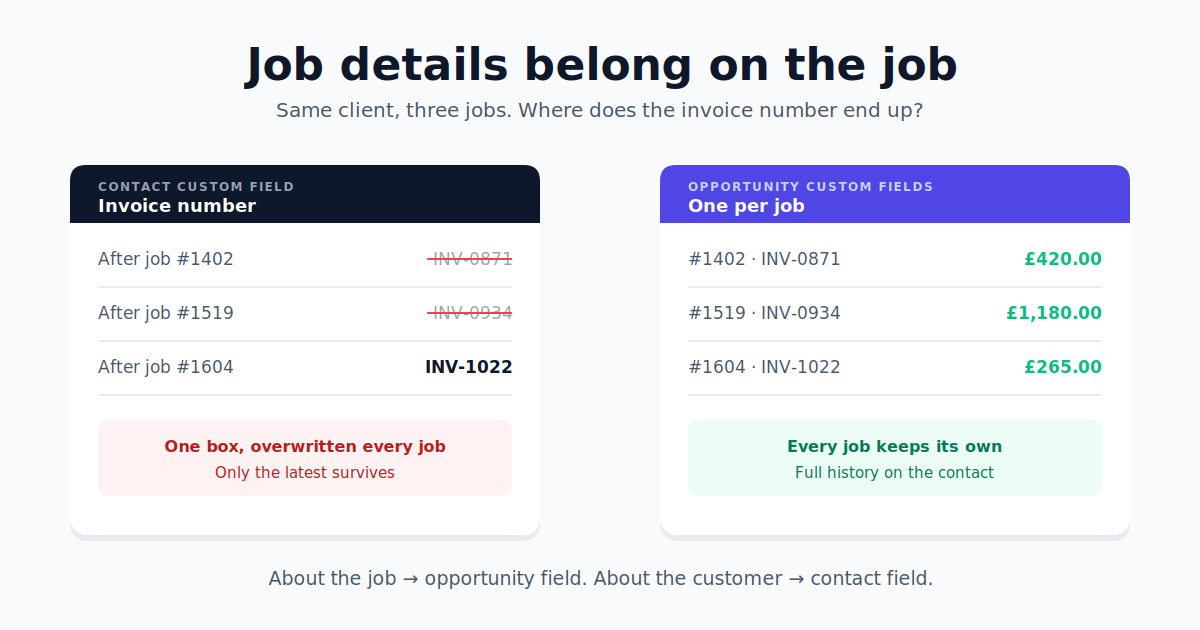
Here's why. A contact holds one value per field. Mrs Jones rings you in January for a consumer unit, £900. In March she wants sockets in the garage, £400. In June it's an EICR, £280.
That's three jobs and £1,580 of work. But your contact record says £280, because each job overwrote the last one. You haven't got a reporting figure. You've got a note of the most recent thing you quoted her.
Every job needs its own record to hold its own value. That record is an opportunity.
What this means if you want to report on anything
Most people who ask me about this are trying to answer a question like:
- What's my average job worth?
- Which enquiry source brings in the best work?
- How much did I quote last month against how much I won?
- What's my conversion rate on EICRs versus rewires?
All of those need the same thing: a number attached to every individual job, sitting next to a label saying what kind of job it was and where it came from.
In GoHighLevel that's an opportunity with a monetary value and some tags on it. Nothing else in the system can hold that shape of data. You can build the smartest dashboard in the world, but if the underlying records don't have values on them, it's got nothing to add up.
The trap: building opportunities with workflows
This is worth calling out because the people who do it are usually the ones putting the most effort in.
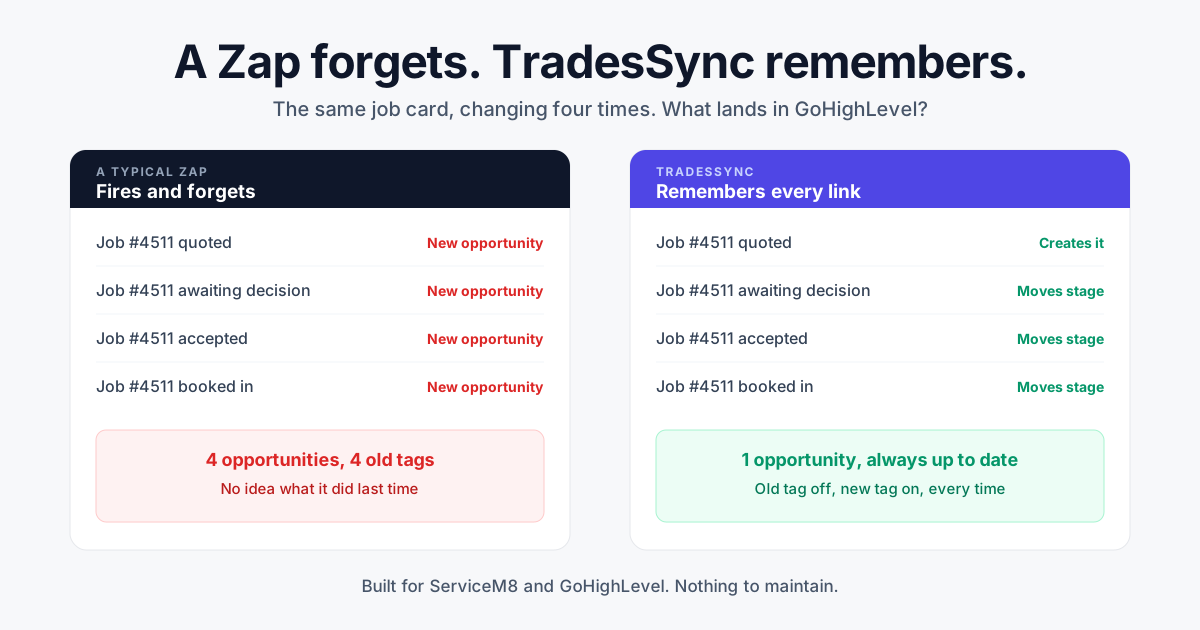
A fairly common setup is to sync contacts and tags into GoHighLevel, then build a workflow that watches for a tag and creates an opportunity when it sees one. It works. It's clever. And it's the hard way round.
The problem is what the opportunity ends up carrying. A workflow triggered by a tag knows one thing: that tag fired. It doesn't know the job's value, its number, its description, when it's due, or what materials are on it — because none of that came with the tag. So you get an opportunity with a name and a stage and nothing else useful on it.
Meanwhile the job card that has all of that on it is sitting right there in ServiceM8.
If your sync can read the job card, let it build the opportunity. It has the full picture; your workflow has a tag. Keep the workflows for what they're genuinely good at — chasing people, sending reminders, notifying you, moving things along. Just don't make them do the job of copying your data across.
One warning if you switch: turn off the create-opportunity step in your workflows at the same time. Otherwise both will be creating them and you'll be looking at everything twice.
Two GoHighLevel settings that catch people out
Duplicate opportunities are off by default. Settings → Objects → Opportunities, there's an option called Allow more than one opportunity per contact in the same pipeline. It ships turned off.
For a trade business that is exactly wrong. Your best customers are the ones who call you back. With that setting off, only their first job ever becomes an opportunity and every repeat job gets silently refused. If you've ever wondered why some jobs just don't appear, start there.
Lost work needs a stage too. People map stages for Quote, Work Order, Completed — and stop. But Unsuccessful is a real outcome and it needs somewhere to live. If you don't give it a stage, those jobs vanish from your pipeline entirely.
Which is backwards, because lost quotes are the most useful number you've got. Won work tells you what you did. Lost work tells you what you nearly did, and where you're leaking. Give it a stage.
The short version
Your job card is the unit of work. In GoHighLevel that unit is called an opportunity. Put your values, your dates and your job details there, tag it with where the work came from, and give every status a stage to land on — including the ones you didn't win.
Do that and GoHighLevel can finally answer the questions you actually want to ask it.
TradesSync syncs your ServiceM8 clients and job cards into GoHighLevel automatically, every five minutes, with no task counting. Clients become contacts, job cards become opportunities, and everything on the job travels with it. Start a 14-day free trial — no card needed.