All documentation
Sending GoHighLevel leads into ServiceM8
ServiceM8 is the source of truth, so everything else in TradesSync flows from ServiceM8 into GoHighLevel. New leads are the one thing that comes back the other way, and only once you switch it on.
The problem it solves
Leads captured in GoHighLevel — a web form, an AI phone answer, a contact your marketing added — never reach ServiceM8 on their own. There is nothing in ServiceM8 for the sync to pick up, so the lead sits in your CRM while your job list knows nothing about it.
Switch this on and each new GoHighLevel contact becomes a ServiceM8 client and a job card at status Quote, ready for you to price. The enquiry that came in at nine at night is on your job list by morning.
There is a second half to this: a customer ServiceM8 already knows, coming back through one of your forms for another quote or callout. That is a repeat enquiry, and it raises a fresh job card against the client you already have rather than skipping them for being known.
What goes where
This direction is fixed rather than mapped. There is no mapping screen for it, on purpose. TradesSync only ever creates new leads in ServiceM8, never edits what is already there, so a lead always lands the same way and your ServiceM8 records stay exactly as your team left them.
| From GoHighLevel | Goes into ServiceM8 as |
|---|---|
| Business name, or first and last name | Client name (new clients only) |
| First name, last name, email, phone | The client’s contact (new clients only), and the job contact on the job |
| Address Line 1, City, State, Postal Code | The client’s Street, City, State and Postcode (new clients only), and the job address, one part per line |
| The message field you choose | The job description (see below) |
| — | A Lead from GoHighLevel note in the Job Diary |
| Any file upload field (photos, documents) | A Job Diary note with a link to each file |
A building or house name belongs in Address Line 1 in GoHighLevel, and arrives at the top of the address in ServiceM8. UK phone numbers are written the local way (07…), the way ServiceM8 holds them.
Capital letters, tidied for you
People fill in web forms in all sorts of ways. A name or address typed all in lowercase, or ALL IN CAPITALS, is tidied before it reaches ServiceM8, so john smith, 12 high street arrives as John Smith, 12 High Street. Postcodes go into capitals, and a UK postcode typed without its space gets one: me87ab becomes ME8 7AB.
- Anything typed properly is left alone. Only text that is all lowercase or all capitals is changed, so names like McDonald, MacLeod or van der Berg arrive exactly as written.
- Company names in capitals stay in capitals, since that is usually on purpose. Only an all lowercase company name is tidied.
- Email addresses and phone numbers are never changed.
- Only new records. It applies to new clients, the job address and the job contact. A client you already have in ServiceM8 is still never edited.
Two URLs, two workflows
GoHighLevel sends the same information whichever trigger fired it — there is nothing in the message itself to say whether a contact was just created or a form was just filled in. So each situation has its own URL, and they are not interchangeable. Both appear in Sync Settings once you save.
Workflow 1 — a new enquiry from someone new
- Go to Sync Settings and find GoHighLevel → ServiceM8.
- Tick the switch and press Save. Your two webhook URLs appear.
- Copy the first URL.
- In GoHighLevel, go to Automation → Workflows and create a workflow with the trigger Contact Created and one action, Webhook, method POST, pasting that URL.
- Set the workflow to Publish. A draft workflow never fires.
No filter is needed here. Anyone ServiceM8 already knows is skipped by this workflow.
Workflow 2 — a repeat enquiry from an existing customer
- Copy the second URL — the one ending
&intent=enquiry. - Create a second workflow with the trigger Form Submitted.
- On that trigger, add the filter Form is and tick only your enquiry forms.
- Add one action, Webhook, method POST, pasting the second URL.
- Publish it.
Without it, every form in your account raises a job card — onboarding forms, internal forms, feedback surveys. Tick only the forms where somebody is asking you to do work.
TradesSync updates your GoHighLevel contacts every time it syncs your ServiceM8 jobs. A workflow built on Contact Updated would therefore fire on our own changes, over and over. Use Contact Created and Form Submitted only.
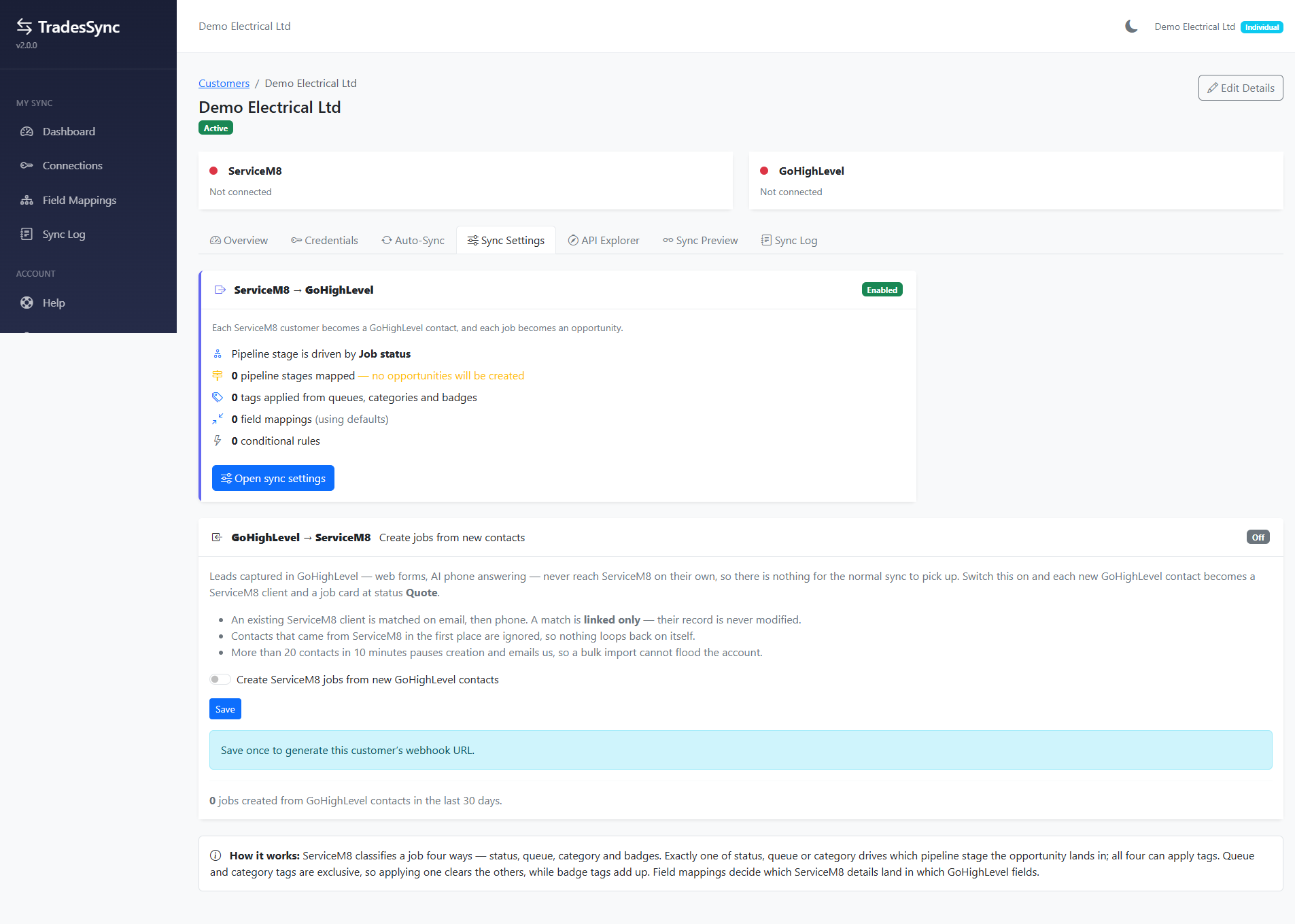
Anyone who has it can create clients in your ServiceM8 account. Do not post it in a shared document, a support thread or a Facebook group.
What it will and will not do
- Existing clients are matched, never edited. If the contact matches a client you already have, on email or phone, TradesSync links to that client and leaves the record exactly as it is.
- A name ServiceM8 already uses gets the mobile added. ServiceM8 will not hold two clients with the same name. If a new lead has a name you already have, such as a first name only, and their email and phone match nobody, the client is created as Sarah (07700900123) rather than being linked to the wrong person. Rename them in ServiceM8 whenever you like. Asking for a first and last name on your form stops this happening.
- Only a client, a job card, a job contact and the job notes are created. No queues, no badges, no custom fields — you decide what happens to the job from there.
- Contacts that came from ServiceM8 are ignored, so nothing bounces back and forth between the two systems.
- A repeat enquiry does not create a second client. It adds another job card to the client you already have, with the person who asked as its job contact. If the person turns out to be new to ServiceM8 after all, they get a client record as well.
- One job per contact per hour. A second submission from the same person within the hour is ignored, so a double-tap on your form cannot produce two job cards. The same goes for someone new filling in a form: both workflows fire, but only one job is created.
- There are hard limits. If more than 10 contacts arrive in 10 minutes, or 25 in a day, it pauses and alerts us rather than filling your account. Nothing is lost — everything is still logged.
- Leads can take up to five minutes to appear in ServiceM8.
Showing the customer’s message in ServiceM8
Pick one GoHighLevel field and whatever is in it becomes the job description on every new job, so whoever opens the job card sees straight away what the customer asked for, without opening GoHighLevel. A short Lead from GoHighLevel note goes in the Job Diary, or Repeat enquiry from GoHighLevel for a returning customer, so you can still tell where the job came from.
What goes in that field is up to you. It can be a single form question such as Tell us about the job, or a field you fill in a GoHighLevel workflow with the customer's message, their form answers and an AI summary all together. TradesSync copies it across as it is.
- In Sync Settings, under GoHighLevel → ServiceM8, find Show the customer’s message in ServiceM8.
- Choose your field from the list — it shows the custom fields in your GoHighLevel sub-account — and press Save.
- That's it. It applies to both workflows — new leads and repeat enquiries.
If you don’t choose a field, TradesSync uses one called Description of works or Enquiry if you have one. If there is no message at all, the job description just says Lead from GoHighLevel.
In GoHighLevel, each question on a form saves into a field, and several forms can save into the same one. Make every form's message box save into the field you picked here.
This matters because a GoHighLevel field keeps its last value on the contact. If a returning customer uses a form that doesn't fill your chosen field, the field still holds the message from their last enquiry, and that old message would be added to the new job. One shared field means every submission overwrites it, so the job always gets the latest message.
If another workflow or an AI step writes to that field after the form is submitted, it may still be empty when the lead arrives. TradesSync reads it again from GoHighLevel when it creates the job, which catches most cases. To be certain, put the Webhook action after whatever fills the field, in the same workflow. If the field is still empty, the job is created with Lead from GoHighLevel as its description and the sync log tells you so.
Photos and files from your form
If your GoHighLevel form has a file upload box, anything the customer uploads is linked on the new job as a note in the Job Diary, one link per file. There is nothing to set up: TradesSync finds file upload fields on its own. For a returning customer the note says the files may be from an earlier enquiry, because GoHighLevel keeps the last upload on the contact.
Seeing what it did
Every lead that reaches the queue has an entry in the Sync Log, marked GHL → SM8. Open it to see exactly what came in from GoHighLevel (name, email, phone, address and message) and what TradesSync sent to ServiceM8, including on a lead that failed. Below that are the steps in plain English: whether the client was matched or created, the job card it raised, the job address and job contact, which field was used for the description, or exactly why nothing was created. If the job was made but the note or the job contact could not be added, the entry is flagged under Needs your attention.
Why the delay
GoHighLevel fires Contact Created the instant the record appears, which is often before the address, tags or form answers have finished saving. Rather than trust that first message, TradesSync treats it as a doorbell: it notes that a contact exists and then goes back to GoHighLevel to read the finished record when it processes the queue.
The result is a ServiceM8 client with the business name and every part of the address filled in, rather than a half-empty record created a second too early.
Turning it off
Untick the switch and save. It stops both workflows immediately. Anything already created in ServiceM8 stays exactly where it is — turning the feature off does not remove clients or jobs it made earlier.